

Today, businesses use messaging apps to communicate and support customers. Telegram and WhatsApp are two of the most popular platforms for this. Both apps offer features for communication, marketing and customer engagement, and each platform has unique strengths for businesses.
Telegram supports large groups, live streaming, unlimited channels, and powerful bots for automation and scale. It also offers a built-in Telegram Business mode with professional tools such as business profiles, quick replies, greeting and away messages, chat tags, and custom chat links. As an open platform, Telegram also supports trusted third-party tools like InviteMember that help businesses automate access, manage subscriptions, and generate recurring revenue, without technical knowledge or coding.
WhatsApp Business is built mainly for one-to-one customer communication and basic business profiles. However, advanced features like automation, multi-user inboxes and others, are not available by default and require access to the WhatsApp Business API, which is gated, requires approval, and often involves third-party developers or custom code.
Understanding the strengths, limitations, and marketing potential of each platform is essential for businesses aiming to maximize reach and engagement. This article explores the strengths, limitations, and marketing potential of WhatsApp Business vs Telegram to help businesses choose the right platform.
How To Use Telegram for Business?
Telegram for business can be used as a professional platform to communicate, market, manage, and even monetize, communities.
Businesses use Telegram powerful features to reach large audiences, automate processes, provide services efficiently, and generate income.
Key aspects of Telegram for business include:
- Channels and Groups
- Channels allow businesses to broadcast messages to unlimited subscribers, ideal for announcements, promotions, or updates.
- Groups enable interactive discussions with members, perfect for communities, feedback, or support.
- Bots and Automation
- Telegram supports custom bots like @InviteMemberBot that turn your Telegram app into a recurring income tool.
- Bots can integrate with other tools to streamline workflows for recurring tasks.
- File Sharing and Media
- Businesses can share large files, videos, or documents, which is helpful for product catalogs, guides, or educational content.
- Telegram supports cloud storage, meaning files remain accessible from any device, without consuming local storage.
- Marketing and Engagement
- Telegram allows businesses to create interactive polls, quizzes, and subscription services to engage audiences.
- Its features support both one-to-many communication and community-driven interactions.
- In terms of Telegram vs WhatsApp marketing, Telegram stands out for large-scale campaigns, while WhatsApp focuses on personalized engagement.
- Security and Privacy
- Telegram offers strong encryption for messages and supports privacy features, which builds trust with users.
- Admin controls allow businesses to manage who sees content, joins groups, or accesses private channels.
- Multi-platform Accessibility
- Telegram works on smartphones, tablets, and desktops, ensuring businesses can manage communications across multiple devices.
- This cross-platform support enables real-time engagement with global audiences.
- Integration with Third-Party Tools
- Telegram can integrate with external services like CRM systems, analytics tools, payment bots, and subscription management platforms.
- These integrations enhance business operations, automate repetitive tasks, and improve customer experience.
Telegram Business Built-In Features
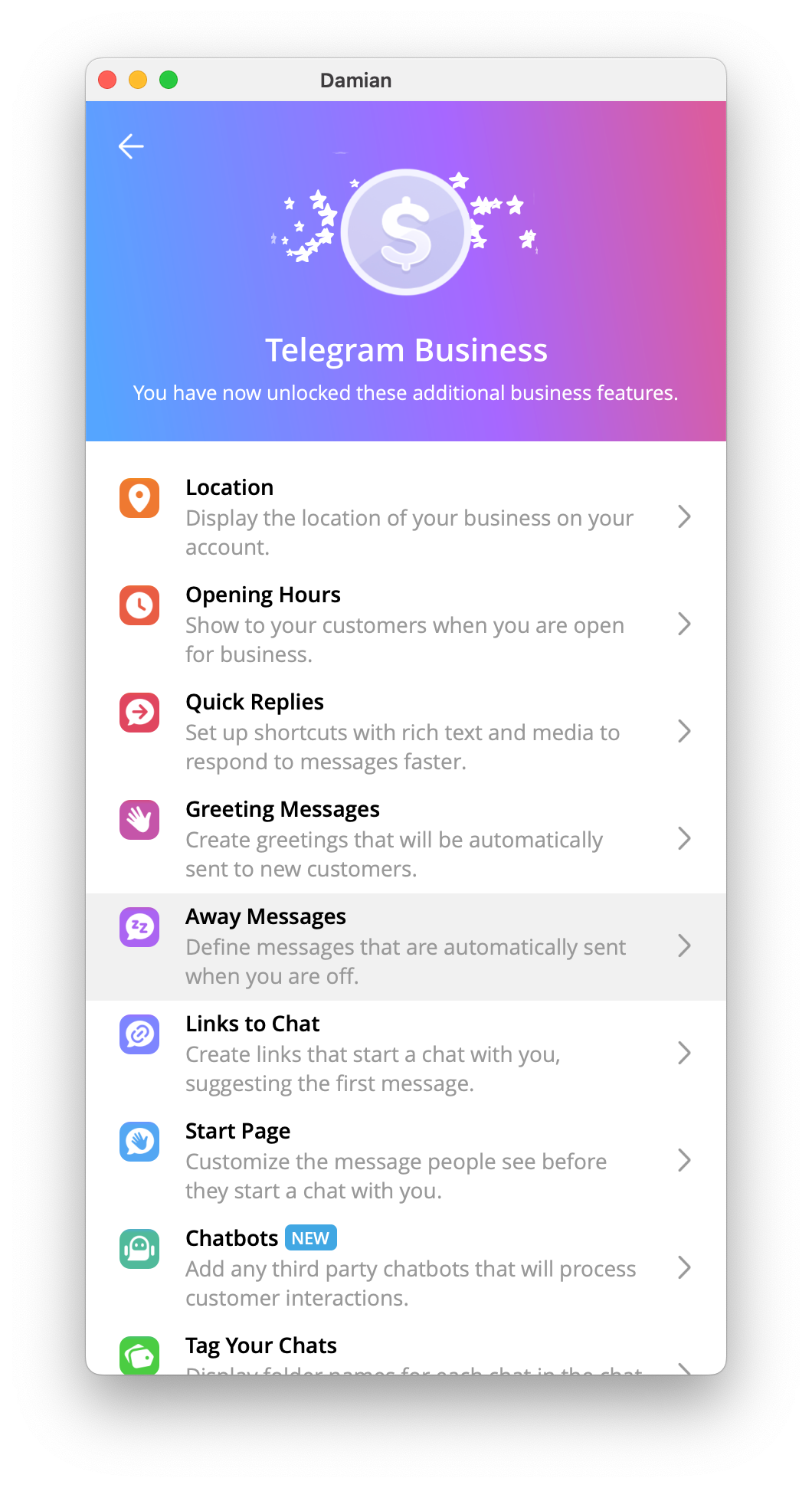
Telegram Business allows any account to become a business account with tools like:
- business profiles,
- custom start pages,
- quick replies,
- greeting and away messages…
These features are available to Telegram Premium users, which is Telegram paid service. However, you can also use other free Telegram tools and further enhance your Telegram Business experience.
How to Make Money on Telegram
Start the @InviteMemberBot on Telegram and follow the steps to create a subscription-based project.
InviteMember lets you sell subscription plans that give customers access to your private groups and channels using your own subscription bot and checkout page.
What is WhatsApp Business?
WhatsApp Business is a specialized version of WhatsApp designed for direct communication with customers. It offers tools for customer support, product catalogs, and basic automation.
However, it is not suitable for all businesses. Advanced automation and scaling require access to the WhatsApp Business API, which is gated, involves approval, and often comes with additional costs.
This makes WhatsApp Business better suited for businesses focused on structured, one-to-one interactions rather than large-scale community engagement.
Key aspects of WhatsApp for Business include:
- Business Profiles
- Businesses can create detailed profiles with essential information such as address, website, hours of operation, and contact details.
- This makes it easier for customers to find and trust the business.
- Messaging Tools
- Automated messages like greeting messages, away messages, and quick replies save time and provide instant responses.
- Labels allow businesses to organize chats by customer type, lead stage, or order status.
- Product Catalogs
- WhatsApp Business lets businesses display a catalog of products or services directly in the app.
- Customers can browse, select, and inquire about products without leaving the chat, streamlining the sales process.
- WhatsApp Business API
- The API allows medium and large businesses to integrate WhatsApp with CRM systems, chatbots, and customer support tools.
- This enables automated notifications, appointment reminders, and more advanced customer service workflows.
- Security and Privacy
- WhatsApp provides end-to-end encryption, ensuring that all messages between businesses and customers remain private and secure.
- Verified business accounts add credibility, helping customers trust communications.
- Multi-platform Access
- WhatsApp Business can be used on smartphones and desktops, allowing teams to manage customer interactions efficiently.
- This cross-platform support ensures businesses can respond promptly, improving engagement and satisfaction.
- Customer Engagement
- WhatsApp allows direct, one-on-one communication, making it ideal for personalized support, answering queries, and building strong customer relationships.
- It also supports group communication, though at smaller scales compared to Telegram.
Telegram for Business vs WhatsApp for Business: Key Comparisons
Choosing between WhatsApp Business vs Telegram depends on your goals, audience, and the type of engagement you want to achieve.

This detailed breakdown of Telegram vs WhatsApp for business highlights how each platform supports different communication and marketing needs.
1. Audience Reach
- WhatsApp: With over 2 billion users worldwide, WhatsApp offers a massive, general audience. It is widely adopted for personal communication, which makes it ideal for direct customer support and small business outreach.
- Telegram: Telegram has a smaller but highly engaged user base (over 1 billion users, reached in less than half the time of WhatsApp). It is popular for communities, niche audiences, and digital content, and its users tend to be more tech-savvy and more receptive to marketing messages.
2. Messaging Features
- WhatsApp: Focuses on one-on-one communication with automated replies, labels, and broadcast lists. Group sizes are limited, which can restrict community engagement.
- Telegram: Offers large groups and channels (up to hundreds of thousands of members), unlimited message broadcasting, and advanced features like polls, quizzes, and bots for interactivity.
3. Automation and Bots
- WhatsApp: Automation is primarily available through the WhatsApp Business API. It supports chatbots, automated notifications, and CRM integration but requires technical setup.
- Telegram: Bots are easy to create and highly flexible. They can manage payments, subscriptions, surveys, and user verification without extensive technical knowledge.
4. File Sharing and Media
- WhatsApp: File sizes are limited (up to 2GB) and formats are more restricted. Best suited for images, videos, and documents in standard business operations.
- Telegram: Supports much larger files, multiple formats, and cloud storage, making it ideal for sharing product catalogs, guides, or large multimedia content.
5. Marketing and Engagement Tools
- WhatsApp: Best for personalized marketing, customer support, and transactional messages. Its direct approach fosters trust but limits large-scale campaigns.
- Telegram: Perfect for community building, running large-scale campaigns, subscriptions, and interactive engagement with bots and channels.
6. Security and Privacy
- WhatsApp: Provides end-to-end encryption for all messages and verified business accounts for credibility.
- Telegram: Offers stronger encryption for secret chats and advanced privacy settings, but standard channels and groups are cloud-based, which allows easier access management.
7. Scalability
- WhatsApp: Suited for small to medium businesses with a manageable number of customer interactions. Scaling requires API integration.
- Telegram: Highly scalable, capable of managing very large audiences, automated subscriptions, and mass communication without slowing down.
When to Choose Telegram Over WhatsApp
When comparing Telegram for Business vs WhatsApp for Business, Telegram is ideal for businesses and creators who want community building, automation, and large-scale engagement. Consider choosing Telegram when:
- You Manage Large Groups or Channels: If you need to manage your groups or channels with large subscribers, Telegram gives you room for that. Using tools like @InviteMemberBot will help you do most of your managing tasks, regardless of the business you do.
- Automation is Critical: Bots can handle payments, subscriptions, surveys, and access management without manual intervention.
- Provide Customer Support: If you want to automate responses and provide support to your customers using Bots, Telegram is your best bet.
- You Need Advanced File Sharing: Telegram allows larger files and multiple formats, which is useful for product catalogs, guides, or multimedia content.
- You Run Marketing Campaigns or Subscriptions: Telegram channels can broadcast messages to thousands of users simultaneously, ideal for promotions or subscription-based models.
- Your Audience Values Privacy and Flexibility: Telegram provides strong encryption and flexible privacy settings for both admins and members.
- Monetize your Contents: If you know you have a money-worthy content, you can just make money off it. Learn how to monetize your Telegram content here. With this, you can even get paid in crypto.
When to Choose WhatsApp Over Telegram
WhatsApp Business is better suited for personalized communication, direct customer support, and transactional messaging. Consider choosing WhatsApp when:
- You Focus on One-on-One Customer Support: WhatsApp’s interface is perfect for answering individual queries and building strong customer relationships.
- Your Business Targets a Large, General Audience: With over 2 billion users worldwide, WhatsApp ensures a broad reach.
- You Want Easy Product Showcasing: The catalog feature allows customers to browse products or services directly in the app.
Conclusion
Both Telegram for Business and WhatsApp for Business offer powerful tools for businesses, but their strengths cater to different goals. Telegram for Business excels at large-scale community engagement, automation, and marketing campaigns, making it ideal for creators, subscription-based services, and businesses targeting niche or highly active audiences.
WhatsApp Business, on the other hand, shines in one-on-one communication, personalized customer support, and direct sales, offering a broad reach and trusted interactions. Choosing between the two depends on your business model, audience size, and communication strategy.

