

No. Telegram cannot turn off the second check after you open a private chat. Hide Read Time can hide the exact time you opened a message, but it does not hide that you opened the conversation.
Use it when you do not want certain people to know the exact minute you saw their message. The second check remains visible.
If your concern is the person rather than the timestamp, block them on Telegram. Blocking stops future direct messages; Hide Read Time does not.
Set up Hide Read Time for the right people
Open Settings → Privacy and Security → Last Seen & Online.
- Set who can see your Last Seen status.
- Use the exceptions on that screen to exclude a particular person when needed.
- Turn on Hide Read Time.
Telegram hides your exact read time from people who cannot see your Last Seen. Anyone you allow to see your Last Seen and Online status can still see the exact time you read their private message.
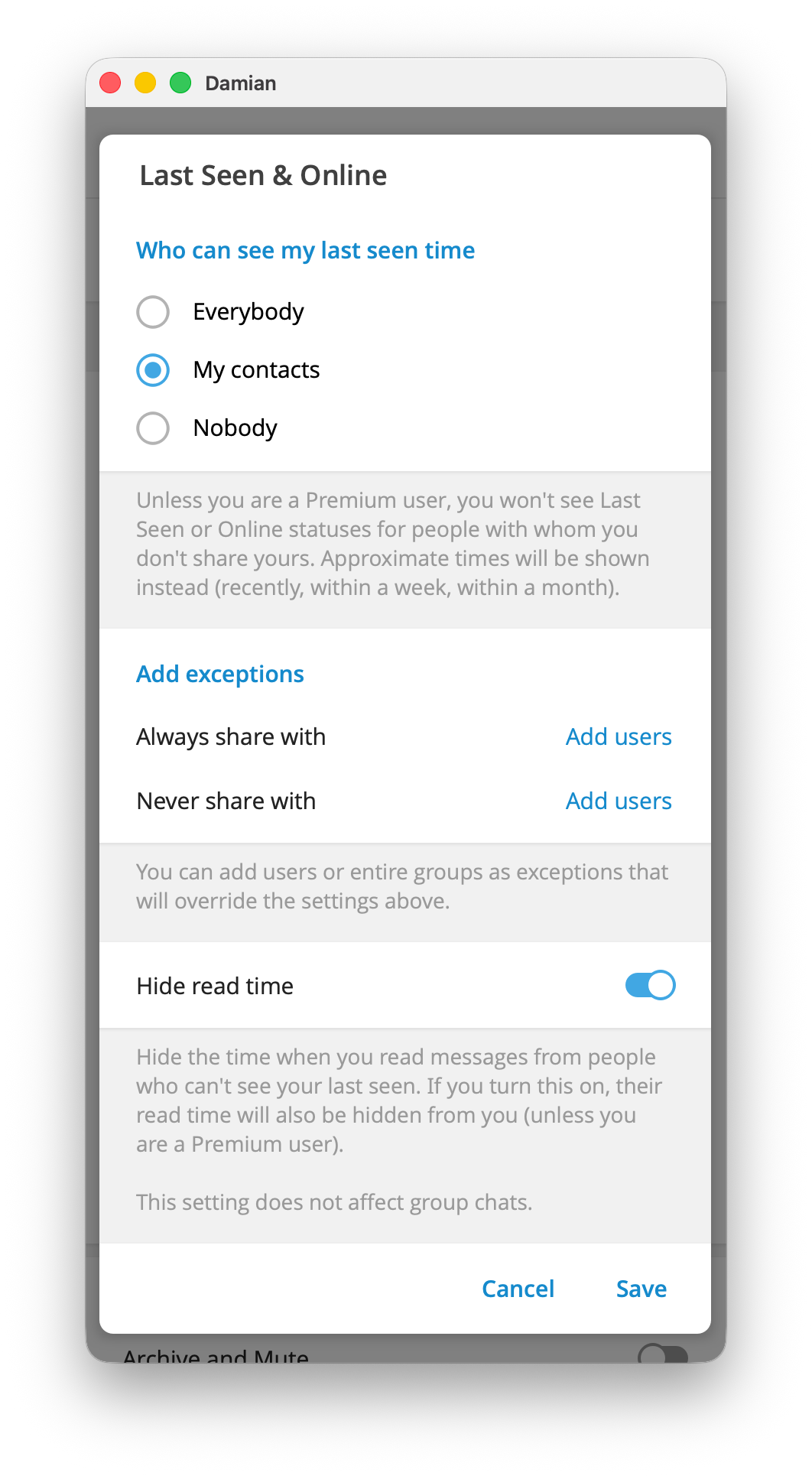
For example, if most contacts can see your Last Seen but one person should not see when you read their messages, add that person to the exception that cannot see your Last Seen. Then enable Hide Read Time. The setting applies to private chats, not group chats.
What the setting cannot hide
- The second check still appears after you open a private conversation. One check means the message reached Telegram's cloud; two checks mean the conversation was opened.
- Reading a private message can show you as online to the sender for about 30 seconds, even if your Last Seen status is hidden from them.
Hide Read Timehides the clock time, not the read event.
The privacy trade-off
Read-time privacy works both ways. When you hide your read time, you also stop seeing the exact time the other person read your messages. Telegram Premium users can still see read times that other people choose to share.
Telegram keeps exact read times in private chats for seven days before deleting them. The other person may still know that you opened the message, but Telegram does not keep the precise minute visible indefinitely.
Groups and channels are different
Hide Read Time has no effect in groups. In a small group, a message gets two checks when at least one other member sees it. The sender can select their message to see which members read it, and Telegram keeps those group read receipts for seven days.
In a channel, the eye icon is a view counter for a post. It is not a private-chat read timestamp, so Hide Read Time does not change it.
If you need a message to disappear after it is opened, use a different tool. Disappearing photos and messages on Telegram can control how long content remains available, but they do not hide a private-chat read receipt.
FAQ
Can I remove the two check marks on Telegram?
No. Telegram has no setting that keeps a private-chat message at one check after you open the conversation.
Can I hide my read time from only one person?
Yes. In Last Seen & Online, put that person in the exception that cannot see your Last Seen, then turn on Hide Read Time. They can still see the second check after you open their chat.
Why did someone see me online after I read their message?
Telegram can show you as online to a person for about 30 seconds after you read a private message from them. Hide Read Time does not remove that exception.
Does Hide Read Time work in groups?
No. It only controls the exact read time in private chats.

