

If you need Telegram support, the fastest answer is this: use the right support path for the specific problem.
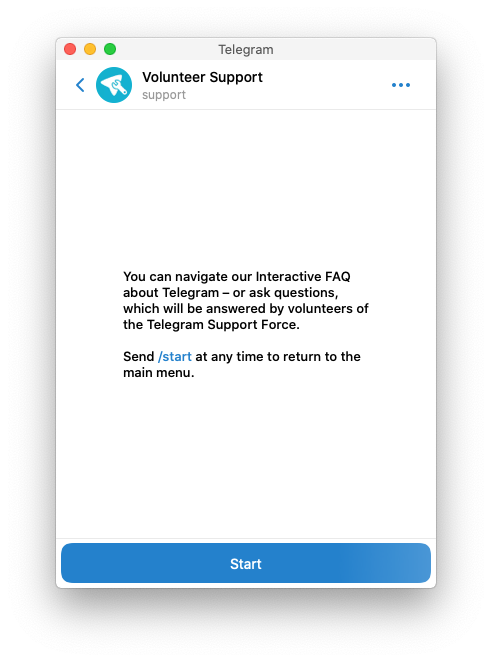
For general questions inside the app, Telegram says to go to Settings -> Ask a Question. If you cannot log in at all, use Telegram's official support form. If your account was limited for spam, contact @SpamBot. If someone is impersonating you, use @NoToScam or the in-app report tools.
The important part is that Telegram does not work like a normal 24/7 customer support desk. Telegram says support relies on volunteers, so this page should help you choose the most realistic next step right away.
Official Telegram support form
If you cannot log in to your account, use Telegram's official support form:
Telegram's FAQ points users with login issues to that form directly.
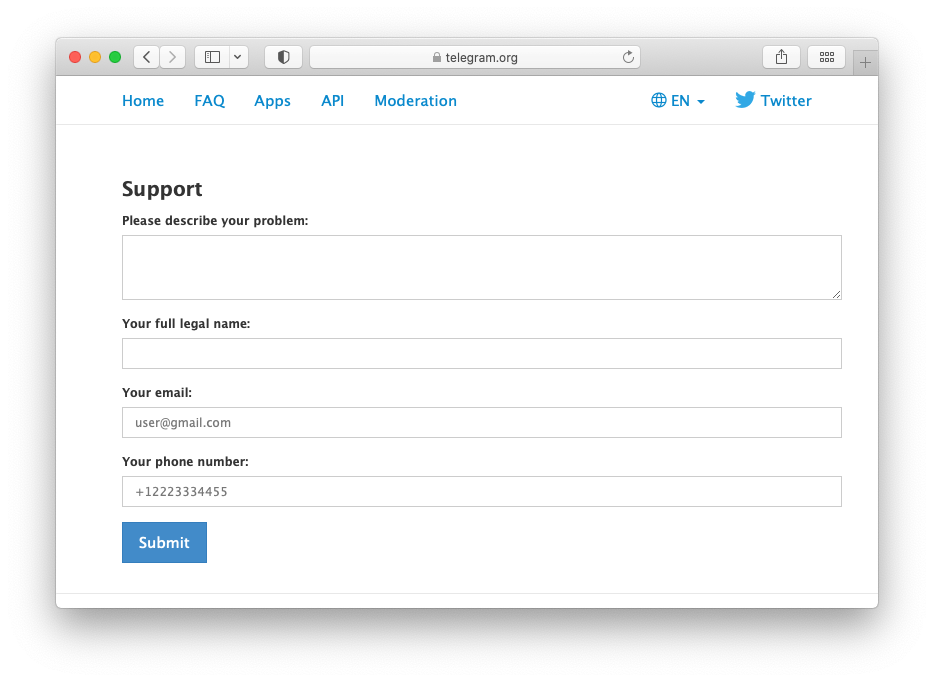
This is the right path when:
- your login or registration is failing
- you cannot receive the code and normal troubleshooting did not help
- the problem is tied to account access, not just a settings question
When you submit the form, include:
- your phone number in international format
- the device and app you are using
- the exact error or problem
- what you already tried
That gives Telegram more context and reduces the chance of a vague back-and-forth.
Ask a question inside Telegram
For normal support questions, Telegram says to contact support in the app:
Settings -> Ask a Question
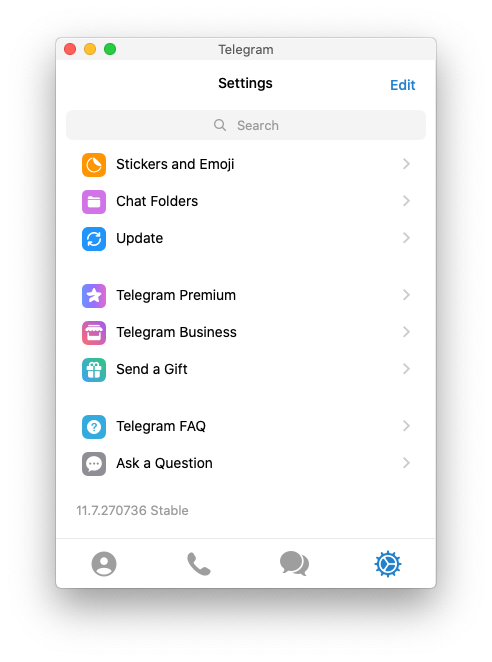
This is better than searching random social accounts because Telegram says support is handled by volunteers inside the official support flow.
Use this path when:
- you can still access your account
- the issue is about app behavior or settings
- you are not locked out completely
Do not expect instant live-chat style help. Telegram explicitly says support relies on volunteers, so response times can vary.
What to do if you cannot log in
Many Telegram support requests are really login problems.
Before you submit the form, try these checks:
1. Enter the phone number in international format
Telegram asks for the number with country code.
2. Check another Telegram device for the code
Telegram says it may send the login code inside Telegram instead of SMS if you recently used Telegram on another device. In that case, open Telegram on the device where you are already signed in and look for the code in the verified Telegram chat.
If you are trying to access Telegram in a browser, this Telegram Web guide explains both QR login and phone-number login.
3. Know when a phone call is possible
Telegram says login codes by phone call are only available for accounts that already have two-step verification enabled.
4. Keep your number current
Telegram warns that receiving codes inside Telegram is not a replacement for having an up-to-date phone number you still control.
If you still cannot get in, use the official form above.
Telegram also lists @smstelegram on X as an official login-help account, but only for login problems. Telegram warns that it does not have other support accounts on social media.
If your account was limited for spam
If Telegram says you cannot message non-contacts, that is usually a spam limit, not a normal support ticket.
Telegram's Spam FAQ says:
- limited accounts can still message people who already saved their number
- the limit often comes from unwanted messages to strangers
- if the limit was applied wrongly, the official route is
@SpamBot
That makes @SpamBot the best next step for wrongful spam restrictions.
If this is your first limit, Telegram says it often expires after a few days. Repeated abuse can last longer.
If your account was hacked, stolen, or you lost your phone
If you still have Telegram open on another device:
- Turn on two-step verification.
- Open
Settings->DevicesorPrivacy & Security->Active Sessions. - Terminate the old session.
- Contact your phone carrier to block the old SIM and reissue your number.
If you do not have access on any other device, Telegram says the first move is to recover the phone number from your carrier, then log back in and terminate the old session.
If you are deciding whether to log out old devices or remove the account entirely, this guide on how to log out of Telegram should help.
If you are done with the account and want to remove it, publish and use the new evergreen guide on how to deactivate Telegram account.
If someone is pretending to be you or scamming people
Telegram's FAQ points impersonation cases to @NoToScam.
That is different from normal support.
Use this route when:
- a scammer is copying your identity
- someone is pretending to represent you or your brand
- you need to report impersonation, not just ask a question
If the bad actor is also posting public content, use the in-app Report tools too.
If you need to report a bot, channel, group, or message
For public content on Telegram, the first path is usually the in-app Report option.
Telegram says:
- on Android, tap the message and choose
Report - on iPhone, press and hold the message
- on Desktop or Web, right-click the message and choose
Report
If you need to email Telegram about public illegal content, Telegram lists:
abuse@telegram.orgfor public illegal contentdmca@telegram.orgfor copyright complaints about public content
If you email, include the exact t.me/... or @... links so moderators can find the content.
What Telegram support usually does not offer
A lot of low-quality pages get this wrong, so it helps to say it clearly.
Telegram does not present itself as a traditional phone-based customer support operation for everyday users.
That means:
- there is no normal public support hotline for routine issues
- not every request gets a personal reply
- social media impersonators are common, so stick to official channels
- some issues are handled by specific routes like
@SpamBot,@NoToScam, or the support form instead of one general inbox
FAQ
Does Telegram have live chat support?
Not in the usual business-support sense. Telegram says to use Settings -> Ask a Question, and it notes that support relies on volunteers.
Does Telegram have a phone number for support?
Telegram does not promote a normal public phone support line for user issues in its FAQ. The official paths are the in-app support route, the support form, and issue-specific channels.
Why is Telegram not answering me?
Support is volunteer-based, so response times can vary. You also may be using the wrong route for the issue. Login problems, spam limits, impersonation, and public abuse reports each have different official paths.
What if I cannot log in at all?
Use the official support form at telegram.org/support, make sure the number is in international format, and check whether Telegram sent the code to another logged-in device first.
How do I remove an old session from another device?
Open Settings -> Devices or Privacy & Security -> Active Sessions, then terminate the old device. If you need more help, this guide on how to log out of Telegram covers that flow.
Final answer
If you want the shortest version: use Settings -> Ask a Question for normal support, telegram.org/support for login issues, @SpamBot for spam limits, and @NoToScam for impersonation.
Choosing the right route matters more than sending the same problem to every Telegram contact point you can find.

