

Telegram channel reactions are the emoji below a post. They let subscribers give a quick response without writing a message.
Use them when one small signal is enough. A check mark can confirm that people saw an instruction. A thumbs-up can show that a post was useful. When you need people to choose between options, explain a problem, or ask for help, use a poll, comments, or messages instead.
This guide is for channels, not groups. On current Telegram Desktop, a group administrator can choose allowed reactions in Manage Group > Reactions, but that panel does not show Maximum Number of Reactions. The per-post limit is part of the channel reaction-management flow, so first check that Telegram calls the space a channel and offers Manage Channel.
Choose the feedback before choosing the emoji
Do not turn on every emoji by default. Pick reactions that have a clear job in your channel.
| What you need to learn | A good setup | Use something else when |
|---|---|---|
| Did people see an important update? | One selected reaction, such as ✅ | You need a written confirmation from each person. |
| Was this post useful? | One or two selected reactions, such as 👍 and 🔥 | You need to know why people liked or disliked it. |
| Which of several options should win? | A Telegram poll | The choices need more than a simple reaction. |
| Does someone need help before buying? | A contact route or support chat | A reaction cannot explain the question. |
| Should a person enter a paid private channel? | A membership bot or membership page | A reaction never grants access. |
The Reactions screen is a channel-wide setting. It controls the reactions available throughout the channel, so choose a small set that works for most of your posts.
Enable reactions in your channel
On mobile
- Open the channel and tap its name at the top of the screen.
- Tap the pencil icon, Edit.
- Select Reactions.
- Choose All reactions to allow the full available set, Selected reactions to pick the emoji your channel uses, or disable reactions to remove them from channel posts.
- Tap Done to save the change.
On Telegram Desktop for a channel
- Open the channel and select the three-dot menu in the top-right corner.
- Choose Manage Channel.
- Select Reactions.
- Choose All reactions, Selected reactions, or disable reactions. When you select reactions, click each emoji you want subscribers to use.
- Click Save.
If the menu says Manage Group instead, you are configuring a group. You can choose its allowed reactions there, but you will not find Maximum Number of Reactions in that current Desktop panel.
Use All reactions for a broad, informal channel where many kinds of replies are welcome. Use Selected reactions when a reaction needs to mean something. For example, a course channel can use ✅ for “I saw this” and ❓ for “I need this explained.” Turn reactions off on posts where a visible response could be misleading, such as an urgent security notice.
What “Maximum Number of Reactions” really means
On a channel's Reactions screen, there are two separate choices:
- Selected reactions is the channel-wide list of emoji people may use.
- Maximum Number of Reactions is the number of different emoji types that may collect reactions below one post.
The maximum does not limit the number of people who can react or the total number of reactions a post can receive.
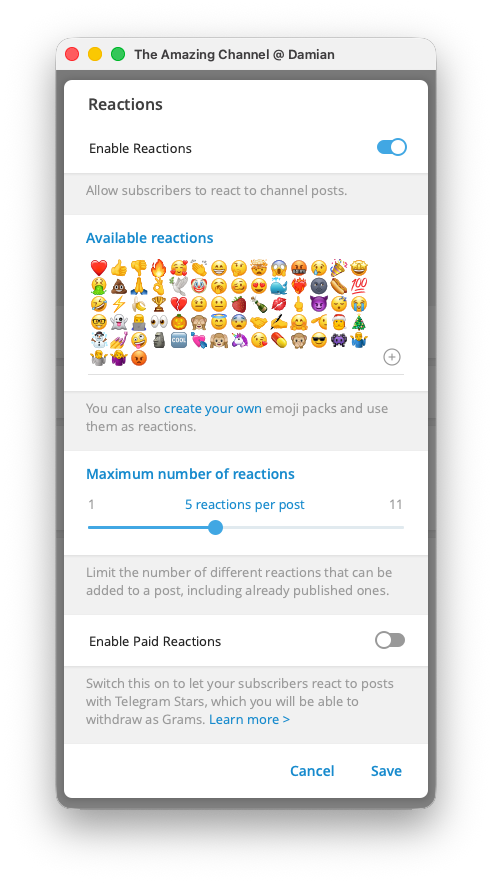
For example, you may allow 👍, 🔥, ✅, and ❓ for the channel, then set the maximum to 2. On a new post, the first people can introduce any two of those reactions. If the post already shows 👍 and 🔥, later readers can add to either of those counts, but cannot introduce ✅ or ❓ as a third reaction type on that post.
This limit also applies to posts already in the channel. That is helpful when you change your selected emoji for a new series or season: older posts do not need to keep collecting every reaction type you once allowed.
Set the maximum to 1 when every reaction should mean the same thing, such as “I saw this.” Set it to 2 only when two different feedback meanings are useful below the same post, such as 👍 for “more like this” and 👎 for “less like this.” Use a poll instead when readers need to choose from several defined options. A larger limit makes the feedback harder to read and rarely gives you a better answer.
Use custom emoji only when they add a meaning
The reaction picker can show custom emoji choices for channels with the required boost level. Telegram shows the boost requirement beside that option. Standard emoji work without treating a custom reaction as a requirement.
Use a custom emoji when your members already know what it means, such as a course badge that means “completed.” Do not add custom emoji only because they move. A familiar standard emoji is usually easier to understand at a glance.
Ordinary reactions, Star tips, and memberships are different
Selected reactions are feedback. Paid reactions are optional Star tips. A paid reaction lets a reader send Telegram Stars to support a channel post; it does not start a subscription, add the reader to a private channel, or extend access they already have.
To turn on that optional support route, open Reactions in your channel settings and enable Paid Reactions. Make it available when readers may want to tip after a useful post. Keep it off when the channel does not need a public tip option.
Stars are separate from a paid membership. For the wider choice between channel revenue methods, see how to monetize a Telegram channel. For the payment difference itself, read Telegram Stars vs Toncoin.
If you run a paid Telegram channel with InviteMember, send people to the membership bot or membership page to buy access. InviteMember applies the plan and controls access to the connected private resource. Reactions can show what current members think about a post, but they cannot replace the purchase and access flow. See how to start a paid community on Telegram or Discord for that setup.
Keep the setting easy to review
Check your selected reactions after a few posts. If readers use them in a way you did not expect, return to Reactions and remove the unclear emoji. When a post needs a real decision, create a poll instead of trying to make several emoji carry a complicated question.
FAQ
Can I turn reactions on for only one Telegram channel post?
No. The Reactions setting applies to the channel. Use a poll when one post needs a different set of answer choices.
Does the maximum number of reactions limit how many people can react?
No. It limits the different reaction types that can appear below one post. It does not cap the audience or the total reaction count.
Why is “Maximum Number of Reactions” missing on Telegram Desktop?
Make sure you are opening a channel, not a group. On current Telegram Desktop, Manage Group > Reactions lets you choose the reactions a group allows, but it does not show that control. Open a channel and use Manage Channel > Reactions to manage the channel setting.
Are paid reactions a Telegram subscription?
No. A paid reaction is a voluntary Star tip on a post. It does not create a membership or give a person access to a private channel.
Can a reaction give someone access to my paid channel?
No. Use the membership bot or membership page for a paid project. That route handles the plan, payment, and access rules.
If you run a paid Telegram channel with InviteMember, send people to the membership bot or membership page to buy access. InviteMember applies the plan and controls access to the connected private resource. Reactions can show what current members think about a post, but they cannot replace the purchase and access flow. See how to start a paid community on Telegram or Discord for that setup.
Keep the setting easy to review
Check your selected reactions after a few posts. If readers use them in a way you did not expect, return to Reactions, remove the unclear emoji, and lower the maximum reaction types per post. When a post needs a real decision, create a poll instead of trying to make several emoji carry a complicated question.
FAQ
Can I turn reactions on for only one Telegram channel post?
No. The Reactions setting applies to the channel. Use a poll when one post needs a different set of answer choices.
Does the maximum number of reactions limit how many people can react?
No. It limits the different reaction types that can appear below one post. It does not cap the audience or the total reaction count.
Are paid reactions a Telegram subscription?
No. A paid reaction is a voluntary Star tip on a post. It does not create a membership or give a person access to a private channel.
Can a reaction give someone access to my paid channel?
No. Use the membership bot or membership page for a paid project. That route handles the plan, payment, and access rules.

