

A free trial lets someone try your paid Telegram channel, group, Discord role, or other member benefit before they pay. It works when people can quickly see why the paid plan is useful.
In InviteMember, you can set the trial days, choose who can use a trial, decide if people need a card, give access to paid resources, send messages to trial users, and check sales and member activity in the dashboard.
First, decide what people will try
Do not offer a trial just because other paid communities offer one. Give people enough time to see the real value of your paid plan.
Answer these questions before you set it up:
- What will trial members get?
- When will they see the best part of the paid offer?
- What will happen when the trial ends?
For example, a member may need to see several daily posts, receive a weekly lesson, join a live call, or use a file library. If it takes a long time to understand the value, a free sample or a low-price first month may work better.
Choose how often someone can use a trial
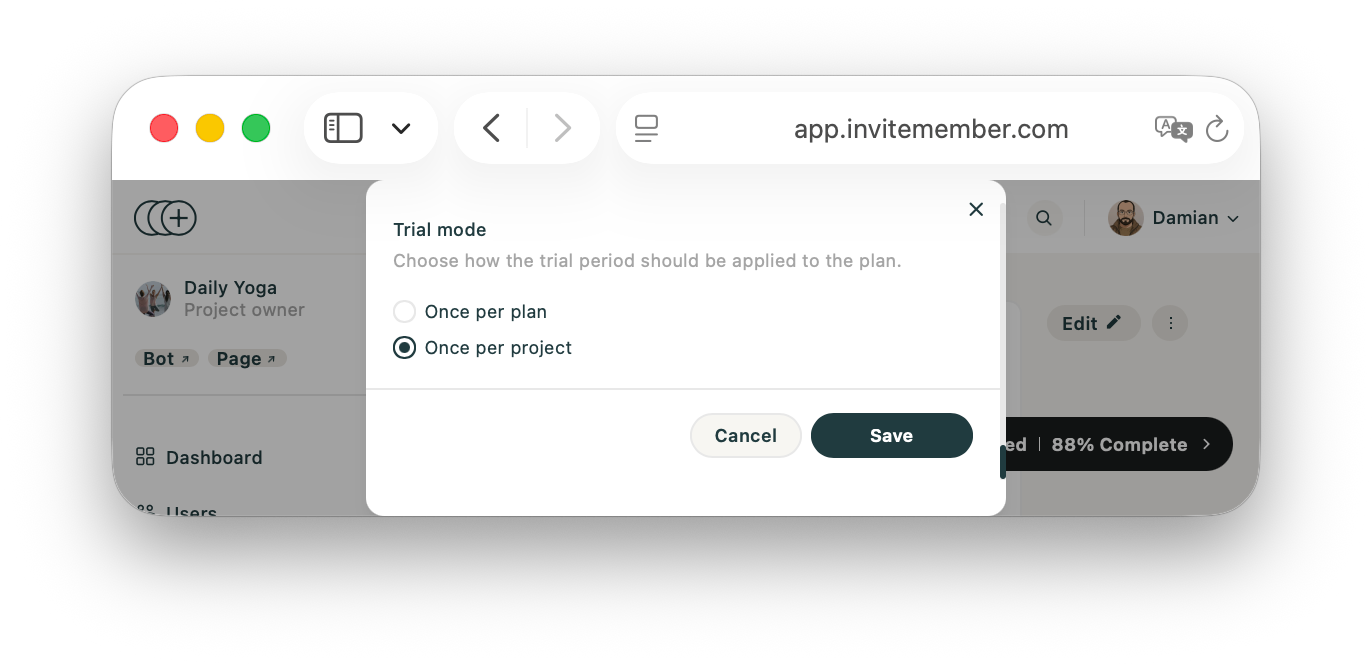
InviteMember gives you two choices:
- Choose Once per project to offer a trial only to absolute newcomers who have never used a plan in your project. If a user has subscribed to any other plan in the project, the trial is not available.
- Choose Once per plan to let people try this specific plan, even if they have used a different plan in your project. If a user has subscribed to this plan before, the trial is not available.
Choose card or no card
InviteMember lets you choose whether someone must enter card details before their trial starts.
| Choice | What happens | What to remember |
|---|---|---|
| Card first | The person enters card details before the trial starts. | Show the plan price, how often they will pay, and the first payment clearly. Test your own payment steps before you publish the plan. |
| No card | The person starts the trial without entering card details. | They have not paid yet. They must choose a paid plan later. |
No-card trial users are in InviteMember's Trialing (no-CC only) broadcast audience. Trials that started with a card are in Active customers with paid members. Do not send a trial-only message to every active customer unless it also makes sense for people who already pay.
Pick the trial length
There is no best number of days for every project. Pick enough time for a fair trial, but not so much that people forget why they joined.
| Your paid offer | Give the trial member enough time to... |
|---|---|
| Daily channel posts | See several normal posts. |
| Weekly lessons or research | Receive one full delivery. |
| A community | Join a real discussion, event, or Q&A. |
| A manual benefit | Receive the file, call, or review that members pay for. |
Start with the shortest trial that lets someone experience the promised value. Change it only after you have checked the full member experience.
Set up the trial in InviteMember
- Open your project. Go to Settings > Subscription plans and edit the paid plan.
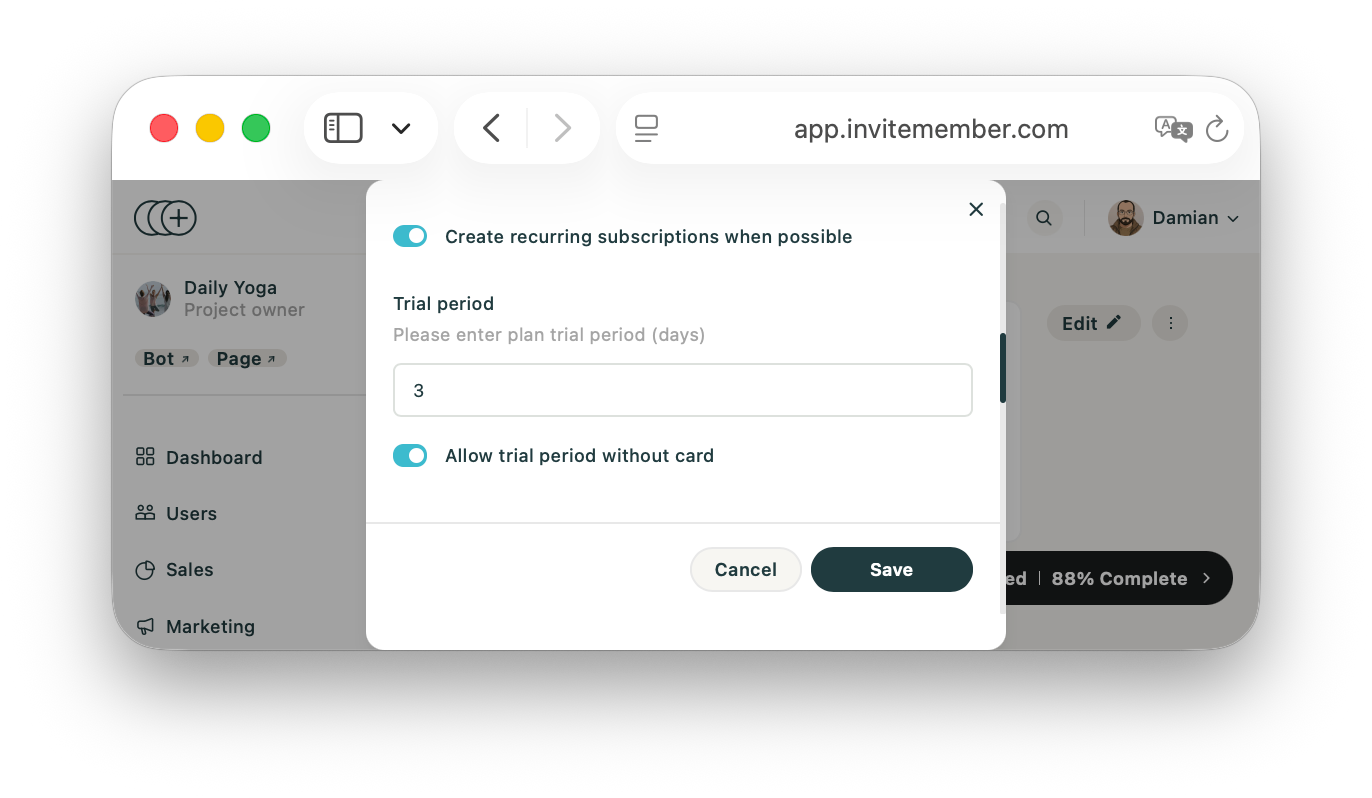
- Find Trial Period. Add the number of days, choose whether people can start without a card, and choose how often a person can use a trial.
- Check what the plan gives members. A plan can include private Telegram channels, Telegram groups, Discord roles, and manual benefits such as files, calls, or consultations.
- Check the price, how often members will pay, and who can buy the plan.
- Test the plan with a second Telegram account. Start the trial, check every resource, read the offer as a new member, and check what happens when the trial ends.
If you still need to build the paid offer, read how to create a paid Telegram channel. For recurring plans, see how to create recurring revenue with a subscription app.
Tell people what will happen
Your offer should answer four simple questions:
- What do I get during the trial?
- How long does it last?
- What will I pay after it ends?
- What should I do if I do not want to continue?
Use the plan's direct link when you promote the trial. You can also use an access code or discount for a small campaign. Keep the offer simple. Do not give people several prices, codes, and plans to choose from at once.
Send the right message
InviteMember broadcasts are sent by you. They are not automatic trial reminders.
- Send a trial offer to Leads when you want to reach people who started your bot but never paid.
- Send a reminder to Trialing (no-CC only) when no-card trial access is about to end.
- Use Active customers carefully. It includes card-started trials and people who already pay.
The /plans command is a clickable link inside a broadcast. It can take people back to your plans. Broadcasts only reach people who started your membership bot and have not blocked it.
Write a useful message. Tell people what they will get next as paid members. Then link to the right plan.
Check what happens when the trial ends
If a payment fails after a free trial, a grace period can keep the member's access active for a set time. Check this setting before you launch the trial. Make sure it matches what you told members.
A grace period is not a second trial. It only handles a payment problem after the trial. For more on failed recurring payments, read dunning management for creators.
See what happened after you launch
The InviteMember Dashboard can show bot users, sales value, one-time payments, and recurring payments. You can compare one period with another and filter by payment option, such as Stripe or PayPal. You can also open user, subscription, and payment records.
This can show whether a trial offer brought more people to your bot or led to more sales. It does not show how many trial users later became paid members.
If you need that number, keep a simple list when each trial starts: the person's name or ID, the date, and the plan. When the trial ends, check the later subscription and payment records. Do not say the trial worked just because the Customers list got bigger. First check which trial users paid.
FAQ
Can I create a free trial without a card?
Yes. In Trial Period, choose to allow access without a card upfront. Those users are in the Trialing (no-CC only) broadcast audience while they have not paid.
Can someone try more than one plan?
It depends on the mode you choose. Once per project gives each person one trial in the project. Once per plan gives each person one trial for each plan.
Can I remind trial members to buy a plan?
Yes. Send a manual broadcast to Trialing (no-CC only) for no-card trials. Be careful with Active customers, because that group also includes paid members.
Does InviteMember show how many trial users paid?
No. The dashboard shows sales and member activity, but it does not show that number. Keep your own list of trial starts if you need to work it out.
Final answer
Use a free trial when people can see the real value of your paid plan in a short time. In InviteMember, set the trial on the paid plan, choose card or no card, give access to the right resources, and send messages to the right people. Use the dashboard to check sales and member activity, but do not assume it shows how many trial users paid.

